Puppet Pin Rigging in After Effects (Skillshare)

Offered by Skillshare,
Puppet Pin Rigging in After Effects (Skillshare)

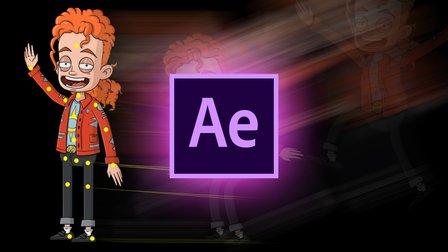
In this course I will take you through the process of rigging and animating a character using the Puppet Pin Tool in After Effects. Throughout the course we will be importing a PSD file, grouping layers, applying pins, and creating a simple animation.

More specifically, main topics for this course include:

  • Overviewing character setup and design
  • Importing multi-Layer assets in After Effects
  • Assembling main body parts into compositions
  • Adjusting Expansion and Density for puppet meshes
  • Creating multiple meshes
  • Creating animation with the pins
  • Polishing animation
  • Exporting animation
Go to Class
MOOC List is learner-supported. When you buy through links on our site, we may earn an affiliate commission.

Related Courses

Texturing characters in Autodesk Maya with Arnold (Skillshare) Skillshare
Skillshare

Texturing characters in Autodesk Maya with Arnold (Skillshare)

In this class you'll learn how to create shaders and textures for 3D characters using the Arnold render engine within Maya. Texturing will allow you to make believable materials for you character's Skin, eyes and hair. For this class you will need a copy of Maya, 2017 or higher, and some experience creating textures in Photoshop.

Self Paced
Self-Paced
Small Doodling exercises- Handwritten letters (Skillshare) Skillshare
Skillshare

Small Doodling exercises- Handwritten letters (Skillshare)

I make illustrations with different texts and words. I use Blender for animating those. For a beginner it can be intimidating but turns out it is pretty simple to start with.Here I give you a small procedure that might help you make something creative really really fast. Try it out on your own and let me know if you had fun doing it.

Self Paced
Self-Paced
How to Animate a Sketch UI using Principle (Skillshare) Skillshare
Skillshare

How to Animate a Sketch UI using Principle (Skillshare)

This class will show you how to add motion to a User Interface that has been designed in Sketch using Prototype. It’s perfect for any designer who creates their UI using Sketch and wants to add motion and interaction to their designs. No prior experience of Principle is required to take the class as I’ll explain how to use it. The only thing you need to do before you take this is to download the Principle app on your machine.

Self Paced
Self-Paced
2D Animation: Roughs, Timing, In-betweens, Clean-ups, Colors and More (Skillshare) Skillshare
Skillshare

2D Animation: Roughs, Timing, In-betweens, Clean-ups, Colors and More (Skillshare)

Do you like Thanksgiving? Want to learn to animate a turkey? This class will teach you how to make a turkey jump from side-to-side with only six drawings! You can apply these same animation techniques to any character you like. The class requirements are the program Rough Animator and a drawing tablet.

Self Paced
Self-Paced
Speed Up Your Workflow With Motion2 From Mt. Mograph (Skillshare) Skillshare
Skillshare

Speed Up Your Workflow With Motion2 From Mt. Mograph (Skillshare)

In this quick course I’ll show you just a handful of the many incredibly useful tools in Mt. Mograph’s Motion2 plugin. There are so many uses for this plugin, and each one of them on their own is worth the full price. I’ll show you how I use Motion2 regularly to speed up my workflow and keep things moving in After Effects.

Self Paced
Self-Paced
Introduction to Blender For Beginners - #1 - Introduction (Skillshare) Skillshare
Skillshare

Introduction to Blender For Beginners - #1 - Introduction (Skillshare)

Welcome to the Introduction to Blender For Beginners Course! Throughout the next series of classes, you will learn the basics of (nearly) everything in Blender. Without needing to invest a whole lot of time or money, you will learn how to get started with 3D modeling, lighting, animation, sculpting, rendering, and physics to name a few with exercises spread throughout so that you can get your first experience with the software and gain overall confidence along the way.

Self Paced
Self-Paced
Introduction to 3D Character Animation: #2 - Setting Up (Skillshare) Skillshare
Skillshare

Introduction to 3D Character Animation: #2 - Setting Up (Skillshare)

In this class, you will set up your environment so that you can start doing some character animation. You will also learn how we will approach animating realistic and believable 3D characters. You don't need to have any experience with any 3D software. However, it is recommended that you use the open-source 3D software Blender as that is what we will be using in this class. If you prefer your own 3D software, you will still be able to follow along and apply the principles in your preferred 3D software.

Self Paced
Self-Paced