Getting Started with Your Raspberry Pi (FutureLearn)

Getting Started with Your Raspberry Pi (FutureLearn)

Discover how to set up and control your new Raspberry Pi, as well as how to use it for everyday tasks and to learn how to code. Start your Raspberry Pi journey with this introductory course. The Raspberry Pi is an accessible and versatile mini-computer – let the Raspberry Pi Foundation guide you on how to get started on your journey of exploring its many uses and applications.

Class Deals by MOOC List - Click here and see FutureLearn's Active Discounts, Deals, and Promo Codes.

On this course, you’ll learn how to get your Raspberry Pi ready to use, before exploring what you can do with it. You’ll see how you could use your Raspberry Pi for everyday tasks, to help you to learn to code, and to get started with physical computing.
Ultimately, you’ll learn how to connect to your Raspberry Pi remotely, and how to take control of your Raspberry Pi as a systems administrator. You’ll also discover more resources to continue your Raspberry Pi journey.
Supported by Micron Technology.

What topics will you cover?

  • The Raspberry Pi Operating System
  • The Raspberry Pi Desktop
  • Adding and using software on your Raspberry Pi
  • Everyday computing with your Raspberry Pi
  • Connecting more hardware
  • Getting started with coding
  • The Unix command line
  • Remote access and security

Learning on this course
You can take this self-guided course and learn at your own pace. On every step of the course you can meet other learners, share your ideas and join in with active discussions in the comments.

What will you achieve?
By the end of the course, you‘ll be able to...

  • Perform an installation of the Raspberry Pi operating system using the Raspberry Pi Imager
  • Modify your setup by connecting additional components and installing new software
  • Explain how your Raspberry Pi can be used for learning to program and getting started with physical computing
  • Apply your knowledge of basic system administration to take more control of your Raspberry Pi

Who is the course for?
This course is for beginners who want to learn how to use their new Raspberry Pi, and have no experience with Unix-based systems.

What software or tools do you need?
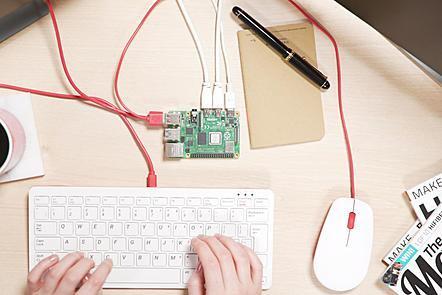
You’ll need a Raspberry Pi (we recommend a Raspberry Pi 4), along with a keyboard, mouse, power supply, micro SD card, and a suitable cable for connecting your Raspberry Pi to your screen. All of these are included in the Raspberry Pi 4 Desktop Kit
Go to Class
MOOC List is learner-supported. When you buy through links on our site, we may earn an affiliate commission.

Related Courses

Introduction to the Internet of Things and Embedded Systems (Coursera) Coursera
University of California, Irvine

Introduction to the Internet of Things and Embedded Systems (Coursera)

The explosive growth of the “Internet of Things” is changing our world and the rapid drop in price for typical IoT components is allowing people to innovate new designs and products at home. In this first class in the specialization you will learn the importance of IoT in society, the current components of typical IoT devices and trends for the future. IoT design considerations, constraints and interfacing between the physical world and your device will also be covered. You will also learn how to make design trade-offs between hardware and software. We'll also cover key components of networking to ensure that students understand how to connect their device to the Internet.

Oct 26th 2026
4 Weeks
Teaching Physical Computing with Raspberry Pi and Python (FutureLearn) FutureLearn
Raspberry Pi Foundation

Teaching Physical Computing with Raspberry Pi and Python (FutureLearn)

Explore the exciting world of physical computing and create electronic circuits that you can control with code. Learn the benefits of using physical computing with your students. On this course from the Raspberry Pi Foundation, you will be introduced to the world of physical computing. You will use input devices to capture data, process that data with the Python programming language, and then use output devices to get information back out from your computer.

Mar 6th 2023
3 Weeks
Design Computing: 3D Modeling in Rhinoceros with Python/Rhinoscript (Coursera) Coursera
University of Michigan

Design Computing: 3D Modeling in Rhinoceros with Python/Rhinoscript (Coursera)

Why should a designer learn to code? As our world is increasingly impacted by the use of algorithms, designers must learn how to use and create design computing programs. Designers must go beyond the narrowly focused use of computers in the automation of simple drafting/modeling tasks and instead explore the extraordinary potential digitalization holds for design culture/practice.

Nov 9th 2026
5-12 Weeks
Computing for Cancer Informatics (Coursera) Coursera
Johns Hopkins University

Computing for Cancer Informatics (Coursera)

One of the key cancer informatics challenges is dealing with and managing the explosion of large data from multiple sources that are often too large to work with on typical personal computers. This course is designed to help researchers and investigators to understand the basics of computing and to familiarize them with various computing options to ultimately help guide their decisions on the topic.

Nov 2nd 2026
4 Weeks
The Raspberry Pi Platform and Python Programming for the Raspberry Pi (Coursera) Coursera
University of California, Irvine

The Raspberry Pi Platform and Python Programming for the Raspberry Pi (Coursera)

The Raspberry Pi is a small, affordable single-board computer that you will use to design and develop fun and practical IoT devices while learning programming and computer hardware. In addition, you will learn how to set up up the Raspberry Pi environment, get a Linux operating system running, and write and execute some basic Python code on the Raspberry Pi. You will also learn how to use Python-based IDE (integrated development environments) for the Raspberry Pi and how to trace and debug Python code on the device.

Oct 26th 2026
4 Weeks
Principles of Computing (Part 2) (Coursera) Coursera
Rice University

Principles of Computing (Part 2) (Coursera)

This two-part course introduces the basic mathematical and programming principles that underlie much of Computer Science. Understanding these principles is crucial to the process of creating efficient and well-structured solutions for computational problems. To get hands-on experience working with these concepts, we will use the Python programming language. The main focus of the class will be weekly mini-projects that build upon the mathematical and programming principles that are taught in the class.

Nov 2nd 2026
4 Weeks
Learn to Code Electronic Music Tools with Javascript (FutureLearn) FutureLearn
Goldsmiths, University of London

Learn to Code Electronic Music Tools with Javascript (FutureLearn)

This course shows you how to build sound synthesizers and drum machines that run in your web browser using Javascript. In this course you will build a range of electronic music tools using the Javascript language and the Web Audio API. You will be shown line by line how to program interactive synthesizers, drum machines and even algorithmic music systems that can generate music automatically.

No sessions available
4 Weeks
Robotics With Raspberry Pi: Build and Program Your First Robot Buggy (FutureLearn) FutureLearn
Raspberry Pi Foundation,National Centre for Computing Education

Robotics With Raspberry Pi: Build and Program Your First Robot Buggy (FutureLearn)

Build and program your first robot buggy using a Raspberry Pi, learning how to connect motors, add sensors and write algorithms. Learn robotics by building a robot buggy and controlling it with a Raspberry Pi. On this course from the Raspberry Pi Foundation, you’ll build a robot buggy controlled by a Raspberry Pi.

Jan 2nd 2023
3 Weeks
Understanding Computer Systems (FutureLearn) FutureLearn
Raspberry Pi Foundation

Understanding Computer Systems (FutureLearn)

Understand how the components of a computer system interact with each other on this online course for computing teachers. Learn what really happens when you turn a computer on. Understanding how a computer works after you press the power button is key to working with technology effectively. On this course, you will explore what happens inside the machine and learn how computers turn inputs into outputs.

Nov 1st 2021
3 Weeks