Working with Version Control (Coursera)

Offered by University of Leeds,
Working with Version Control (Coursera)

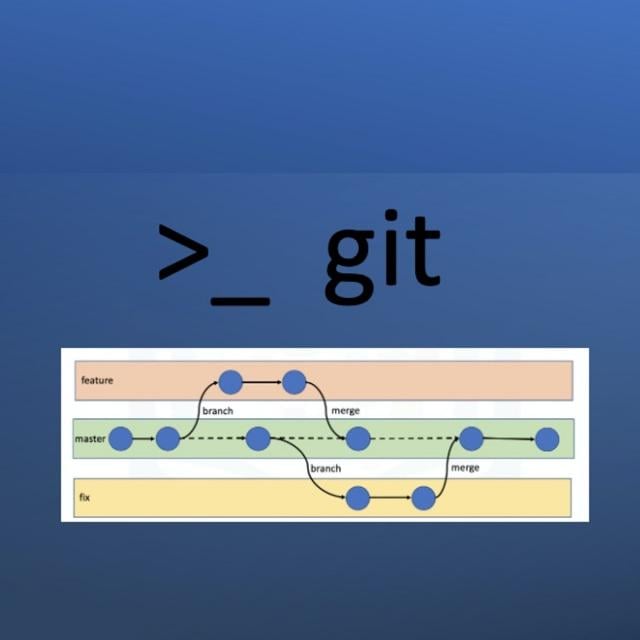
Version control is a crucial tool for managing code. Explore the basics of version control and learn how to use it in software development projects. In this course, you will explore Git, a popular version control tool which you will learn to use to create repositories, make commits, and ensure your code is organised and up-to-date.

Class Deals by MOOC List - Click here and see Coursera's Active Discounts, Deals, and Promo Codes.

You will also practice Markdown, a widely-used markup language, used to create professional and concise documentation for your software projects. You will explore Markdown syntax essentials, enabling you to create headings, lists, links, and images. By the end, you'll be equipped to produce polished documentation that complements your code repositories.
Gaining confidence in version control and Markdown, you'll adhere to best practices in organising, updating, and maintaining your code.

What you'll learn

  • Describe the meaning and purpose of version control, understanding its role in managing and tracking changes in software development projects.
  • Identify the benefits for developers when using version control.
  • Learn to generate/ utilise SSH keys, use basic Git commands, access public repositories, set up project boards and use issue trackers.
  • Leverage Github's markdown language for formatting text and bios.

Syllabus

Week 1: Introduction to version control
Module 1
This week, we'll be getting started with the basics of version control and learning how to use Git, one of the most popular version control systems used by developers worldwide. You'll learn how to create repositories, track changes to your code and collaborate with others using branches and public repositories. By the end of the week, you'll have a solid understanding of the fundamentals of version control and be ready to take your coding skills to the next level!

Week 2: Documenting with Markdown
Module 2
This week, we'll be exploring collaboration and documentation with Markdown. You'll learn how to use Markdown to create polished and professional-looking documentation for your software projects. Markdown is designed to be easy to read and write, even for non-experts. You don't need any special software or knowledge to use it, and it's widely supported by many popular platforms and apps. So let's go!

Week 3. Using GitHub Projects and Issue Tracker
Module 3
This week, you will learn about GitHub Projects and Issue Tracker, and discover how they can help you manage and track issues and tasks within your project. Together, GitHub Projects and Issue Tracker provide a powerful suite of tools for managing your software development projects. With them, you can stay organised, collaborate more effectively with your team and track your progress as you work towards your goals. Get ready to take your collaboration and documentation skills to the next level!

Go to Class
MOOC List is learner-supported. When you buy through links on our site, we may earn an affiliate commission.

Related Courses

Code Yourself! An Introduction to Programming (Coursera) Coursera
University of Edinburgh,Universidad ORT Uruguay

Code Yourself! An Introduction to Programming (Coursera)

Have you ever wished you knew how to program, but had no idea where to start from? This course will teach you how to program in Scratch, an easy to use visual programming language. More importantly, it will introduce you to the fundamental principles of computing and it will help you think like a software engineer.

Aug 3rd 2026
5-12 Weeks
Bash Scripting and System Configuration (Coursera) Coursera
Codio

Bash Scripting and System Configuration (Coursera)

Code and run your first Bash script in minutes without installing anything! This course is designed for learners with no scripting experience. Learners will gain hands-on practice on an Ubuntu system that can be easily transferred to other Unix-based operating systems. The modules in this course cover scripting basics (e.g. control structures), advanced scripting (e.g. regular expressions), git version control, and system configuration (e.g. installing and updating).

Jul 27th 2026
4 Weeks
Fundamentals of Web Development (Coursera) Coursera
Illinois Tech

Fundamentals of Web Development (Coursera)

This course will cover the creation of Web pages and sites using HTML, CSS, Javascript, jQuery, and graphical applications as well as the client and server architecture of the Internet and related web technologies. The creation and deployment of modern, standards-compliant web pages are addressed. Students create and deploy a Web site with multiple pages and cross-linked structures.

Aug 10th 2026
5-12 Weeks
HTML, CSS, and Javascript for Web Developers (Coursera) Coursera
Johns Hopkins University

HTML, CSS, and Javascript for Web Developers (Coursera)

Do you realize that the only functionality of a web application that the user directly interacts with is through the web page? Implement it poorly and, to the user, the server-side becomes irrelevant! Today’s user expects a lot out of the web page: it has to load fast, expose the desired service, and be comfortable to view on all devices: from a desktop computers to tablets and mobile phones. In this course, we will learn the basic tools that every web page coder needs to know. We will start from the ground up by learning how to implement modern web pages with HTML and CSS.

Jul 28th 2026
5-12 Weeks
Linux Cloud and DevOps (Coursera) Coursera
LearnQuest

Linux Cloud and DevOps (Coursera)

In this course, we look at Cloud, DevOps and the Linux operating system. The course material is a good for anyone preparing for the Linux Foundation Certified IT Associate (LFCA) exam or just interested in learning more about Linux. This course is the fourth course in a series that aims to prepare you for working as an information technology professional.

Jul 27th 2026
4 Weeks
Introduction to HTML5 (Coursera) Coursera
University of Michigan

Introduction to HTML5 (Coursera)

Thanks to a growing number of software programs, it seems as if anyone can make a webpage. But what if you actually want to understand how the page was created? There are great textbooks and online resources for learning web design, but most of those resources require some background knowledge. This course is designed to help the novice who wants to gain confidence and knowledge. We will explore the theory (what actually happens when you click on a link on a webpage?), the practical (what do I need to know to make my own page?), and the overlooked (I have a page, what do I do now?).

Jul 20th 2026
3 Weeks
Automate Cybersecurity Tasks with Python (Coursera) Coursera
Google

Automate Cybersecurity Tasks with Python (Coursera)

This is the seventh course in the Google Cybersecurity Certificate. These courses will equip you with the skills you need to apply for an entry-level cybersecurity job. You’ll build on your understanding of the topics that were introduced in the sixth Google Cybersecurity Certificate course. In this course, you will be introduced to the Python programming language and apply it in a cybersecurity setting to automate tasks.

Jul 27th 2026
4 Weeks
JavaScript Interview Challenges (Coursera) Coursera
Scrimba

JavaScript Interview Challenges (Coursera)

Your essential tech interview preparation pack! Practice solving problems and honing the skills you need to succeed in a frontend coding interview. Are you applying for frontend developer roles? Do you wish to test out your JavaScript knowledge? Do you love solving code challenges? If any of the above applies to you, JavaScript Interview Challenges should be your next Scrimba course!

Jul 27th 2026
3 Weeks
Advanced Styling with Responsive Design (Coursera) Coursera
University of Michigan

Advanced Styling with Responsive Design (Coursera)

It used to be the case that everyone viewed webpages on about the same size screen. But with the explosion of the use of smartphones to access the Internet, the landscape of design has completely changed. People viewing your site will now expect that it will perform regardless of the platform (smartphone, tablet, laptop, or desktop computer). This ability to respond to any platform is called responsive design.

Jul 20th 2026
4 Weeks
Design Computing: 3D Modeling in Rhinoceros with Python/Rhinoscript (Coursera) Coursera
University of Michigan

Design Computing: 3D Modeling in Rhinoceros with Python/Rhinoscript (Coursera)

Why should a designer learn to code? As our world is increasingly impacted by the use of algorithms, designers must learn how to use and create design computing programs. Designers must go beyond the narrowly focused use of computers in the automation of simple drafting/modeling tasks and instead explore the extraordinary potential digitalization holds for design culture/practice.

Jul 20th 2026
5-12 Weeks