Stylized Hand Painting in MAYA for Mobile Devices (beginners) (Skillshare)

Offered by Skillshare,
Stylized Hand Painting in MAYA for Mobile Devices (beginners) (Skillshare)

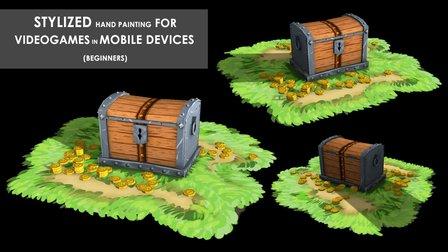
This is a FREE hand painting training for beginners. You will learn the traditional hand painting techniques for Stylized art. We will texture our asset in 2d. Which software is required? Maya 2019 and adobe photoshop. What you will learn? We are going to cover a lot of topics starting with modeling simple low poly assets, uv mapping or unwraping, texturing, hand painting techniques, ambient occlusion maps and more.

Finally you will be ready to create your own 3d asset. If you are an illustrator artist and want to give the next 3d step, this course is for you.
Create a simple asset in Autodesk Maya, you need to start with the modeling process using simple meshes and low polygon techniques, then you need to create the uv maps. This step is very important, your texture will not deform if you create your uv maps correctly. Finally you will need texture it on Adobe Photoshop inlcuding the AO map created on autodek maya.
step 1. Modeling
step 2.Uv mapping
step 3.Texturing and AO map
step 4.Final details, Create Project

Go to Class
MOOC List is learner-supported. When you buy through links on our site, we may earn an affiliate commission.

Related Courses

How to Morph Complex Shapes in After Effects (Skillshare) Skillshare
Skillshare

How to Morph Complex Shapes in After Effects (Skillshare)

Morph Anything into Anything in After Effects Without Extra Plugins. In this tutorial, you will see the steps of morphing complex figures in After Effects. You don't need any extra plugins or programs for the animation. There are three examples of animation workflow. All of them are based on a simple principle: break the animation into steps, and morph a figure to the transitional state. In the end, you can see a screencast of a workflow on morphing a human face into Hulk.

Self Paced
Self-Paced
3D Modeling: Character Modeling Challenge (Skillshare) Skillshare
Skillshare

3D Modeling: Character Modeling Challenge (Skillshare)

Are you tired of being a newbie with all the 3D modeling and animation you're learning? Do you want to learn and level up past being a novice? If that's you then this challenge is for you. The key to becoming great at anything is practice and progress, and that's what this challenge is all about. It doesn't matter when you start. Just get started! I'll be watching the projects closely as you create your characters each day.

Self Paced
Self-Paced
How to create Amazing 3D Hair & Fur in Maya (Skillshare) Skillshare
Skillshare

How to create Amazing 3D Hair & Fur in Maya (Skillshare)

Creating stylised and believable hair in 3D has been traditionally technically and artistically challenging. However since Maya 2018 there is a more artist friendly set of tools to make hair. The XGen Interactive Grooming Tools, make creating and styling hair really simple by using a series of interactive grooming tools that you can use in the Maya viewport.

Self Paced
Self-Paced
Exporting GIFs with Adobe Media Encoder - For Windows and Mac OS (Skillshare) Skillshare
Skillshare

Exporting GIFs with Adobe Media Encoder - For Windows and Mac OS (Skillshare)

Learn how to best export your animation as a GIF, whether you are on Windows or Mac OS, using Adobe After Effects and Adobe Media Encoder. There are many ways to create a GIF and even more limitations when it comes to posting it on social media. In this class, I'll go through the process of creating encoding presets, you can use to render out your GIF, what to look out for regarding duration, social media platform and GIF format limitations!

Self Paced
Self-Paced
Introduction to Hand-Drawn Animation With Animatic (Skillshare) Skillshare
Skillshare

Introduction to Hand-Drawn Animation With Animatic (Skillshare)

Learn how to get started creating animations by hand using the free Animatic app for iOS and Android devices in this free class. I'll get you up and running with Animatic and walk you through my entire process for animating by hand. We'll even touch on some basic animation practices like timing, spacing and squash & stretch. By the end of the class you'll have your very own hand-drawn animation!

Self Paced
Self-Paced
Small Doodling exercises- Handwritten letters (Skillshare) Skillshare
Skillshare

Small Doodling exercises- Handwritten letters (Skillshare)

I make illustrations with different texts and words. I use Blender for animating those. For a beginner it can be intimidating but turns out it is pretty simple to start with.Here I give you a small procedure that might help you make something creative really really fast. Try it out on your own and let me know if you had fun doing it.

Self Paced
Self-Paced
Create Smooth Lip Syncs in After Effects (Skillshare) Skillshare
Skillshare

Create Smooth Lip Syncs in After Effects (Skillshare)

This awesome technique will enable you to create smooth lip syncs in Adobe After Effects. The technique is especially suitable for slow talking characters, but works great at other speeds as well. It's a fun and short class that's straight to the point. If you really want to spice up you character animations in Adobe After Effects, then this class is definitely for you! What are you waiting for? Let's get those lips moving! I'm sure your characters have something fun to say :-)

Self Paced
Self-Paced
Texturing characters in Autodesk Maya with Arnold (Skillshare) Skillshare
Skillshare

Texturing characters in Autodesk Maya with Arnold (Skillshare)

In this class you'll learn how to create shaders and textures for 3D characters using the Arnold render engine within Maya. Texturing will allow you to make believable materials for you character's Skin, eyes and hair. For this class you will need a copy of Maya, 2017 or higher, and some experience creating textures in Photoshop.

Self Paced
Self-Paced
Writing Explainer Animations In After Effects (Skillshare) Skillshare
Skillshare

Writing Explainer Animations In After Effects (Skillshare)

Learn how to uniformly execute an explainer animation from scratch. If you want to learn how motion explainer animation is created from scratch. You are on the right place. Even if you are beginner or intermediate, you'll get extremely useful tips and tricks. The process that is shared makes your animation work flow much more faster than ever.

Self Paced
Self-Paced
2D Animation: Roughs, Timing, In-betweens, Clean-ups, Colors and More (Skillshare) Skillshare
Skillshare

2D Animation: Roughs, Timing, In-betweens, Clean-ups, Colors and More (Skillshare)

Do you like Thanksgiving? Want to learn to animate a turkey? This class will teach you how to make a turkey jump from side-to-side with only six drawings! You can apply these same animation techniques to any character you like. The class requirements are the program Rough Animator and a drawing tablet.

Self Paced
Self-Paced
Photoshop Fundamentals in One Hour (Skillshare) Skillshare
Skillshare

Photoshop Fundamentals in One Hour (Skillshare)

If you’ve ever wanted to try digital painting, but you’re intimidated by photoshop, this course is for you! We’ll go through all of the software’s core functions and tools in a series of easy-to-follow lessons that will have you up and running in no time. These lessons are the building blocks that you will carry forward to the incredibly cool digital painting courses that we offer. So enroll today and let's get you on board with Photoshop!

Self Paced
Self-Paced