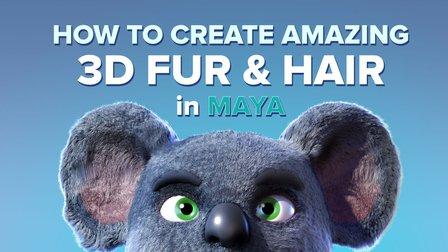
How to create Amazing 3D Hair & Fur in Maya (Skillshare)

Offered by Skillshare,
How to create Amazing 3D Hair & Fur in Maya (Skillshare)

Creating stylised and believable hair in 3D has been traditionally technically and artistically challenging. However since Maya 2018 there is a more artist friendly set of tools to make hair. The XGen Interactive Grooming Tools, make creating and styling hair really simple by using a series of interactive grooming tools that you can use in the Maya viewport.

During this class I'll be showing you:

  • The main concepts of how to make hair in Maya
  • How to stylise hair in XGen using interactive brushes
  • Improve the look of your hair by using Modifiers and textures

It's time to create some 3D fur. Take one of the base meshes included in the resources page or you can use your own 3D character. Use the xgen interactive tools to groom and stylise your fur and share an image of what you create on the community page. I recommend you look at some reference photos of animal fur while you work.
Don't be too precious about your first groom! Even adding a pair of eyes and a nose can turn these spheres into some cute simple characters.
By the end of this class you will have the confidence to make hair and groom your own fluffy creatures. Feel free to follow me on Skillshare and social media.

Go to Class
MOOC List is learner-supported. When you buy through links on our site, we may earn an affiliate commission.

Related Courses

3D Modeling: Character Modeling Challenge (Skillshare) Skillshare
Skillshare

3D Modeling: Character Modeling Challenge (Skillshare)

Are you tired of being a newbie with all the 3D modeling and animation you're learning? Do you want to learn and level up past being a novice? If that's you then this challenge is for you. The key to becoming great at anything is practice and progress, and that's what this challenge is all about. It doesn't matter when you start. Just get started! I'll be watching the projects closely as you create your characters each day.

Self Paced
Self-Paced
Introduction To Animation (Skillshare) Skillshare
Skillshare

Introduction To Animation (Skillshare)

In this pilot episode, we will learn how to animate Spike the Bee from the old school Disney cartoons. For this first class, we will nail down his design, followed by drawing out thumbnails of the character in action. This is a class aimed at students who are either just starting off in the medium or for students who already have some prior knowledge of the art form. This class is great for beginners, hobbyists, and professionals in the field because you can use these skills and your understanding of the character to create your subjects on model in various expressions or poses.

Self Paced
Self-Paced
Materials Deep Dive with Blender (Skillshare) Skillshare
Skillshare

Materials Deep Dive with Blender (Skillshare)

Have you ever wondered how to make your models look more realistic? The key is usually that the model looks unrealistically perfect. Real-life things have wear and tear on them. That's where this class comes in. You're going to take a deep dive into learning how to use procedurally generated materials for rust and wear. By Procedurally, we mean that it's all created within blender without using externally taken photographs.

Self Paced
Self-Paced
Animating Illustrations: Fundamentals of After Effects (Skillshare) Skillshare
Skillshare

Animating Illustrations: Fundamentals of After Effects (Skillshare)

Ever just want to jump right into After Effects but feel it's way too complicated? This is the perfect time for you to start! You'll be learning how to bring an illustration to life using this fabulously creative program. Firstly, we'll take a quick tour around After Effects so you can get to know the interface and from there we'll import and convert an Adobe Illustrator file for use in After Effects and then use it to do some very simple animation so you can get used to keyframing and the timeline.

Self Paced
Self-Paced
Writing Explainer Animations In After Effects (Skillshare) Skillshare
Skillshare

Writing Explainer Animations In After Effects (Skillshare)

Learn how to uniformly execute an explainer animation from scratch. If you want to learn how motion explainer animation is created from scratch. You are on the right place. Even if you are beginner or intermediate, you'll get extremely useful tips and tricks. The process that is shared makes your animation work flow much more faster than ever.

Self Paced
Self-Paced
How to Animate a Sketch UI using Principle (Skillshare) Skillshare
Skillshare

How to Animate a Sketch UI using Principle (Skillshare)

This class will show you how to add motion to a User Interface that has been designed in Sketch using Prototype. It’s perfect for any designer who creates their UI using Sketch and wants to add motion and interaction to their designs. No prior experience of Principle is required to take the class as I’ll explain how to use it. The only thing you need to do before you take this is to download the Principle app on your machine.

Self Paced
Self-Paced
PowerPoint for Beginners - Program & Animation Basics (Free class) (Skillshare) Skillshare
Skillshare

PowerPoint for Beginners - Program & Animation Basics (Free class) (Skillshare)

This course is intended for beginner and inexperienced designers, who aspire to learn Microsoft PowerPoint for professional or private use. No matter if you want to add a new skill to your portfolio, create videos, impress at work or start beeing an online entrepreneur. If you have very little experience with the software or are a total beginner and this will be the first time you open the software - this is the right course for you!

Self Paced
Self-Paced
Texturing characters in Autodesk Maya with Arnold (Skillshare) Skillshare
Skillshare

Texturing characters in Autodesk Maya with Arnold (Skillshare)

In this class you'll learn how to create shaders and textures for 3D characters using the Arnold render engine within Maya. Texturing will allow you to make believable materials for you character's Skin, eyes and hair. For this class you will need a copy of Maya, 2017 or higher, and some experience creating textures in Photoshop.

Self Paced
Self-Paced
Speed Up Your Workflow With Motion2 From Mt. Mograph (Skillshare) Skillshare
Skillshare

Speed Up Your Workflow With Motion2 From Mt. Mograph (Skillshare)

In this quick course I’ll show you just a handful of the many incredibly useful tools in Mt. Mograph’s Motion2 plugin. There are so many uses for this plugin, and each one of them on their own is worth the full price. I’ll show you how I use Motion2 regularly to speed up my workflow and keep things moving in After Effects.

Self Paced
Self-Paced
Introduction to Blender For Beginners - #1 - Introduction (Skillshare) Skillshare
Skillshare

Introduction to Blender For Beginners - #1 - Introduction (Skillshare)

Welcome to the Introduction to Blender For Beginners Course! Throughout the next series of classes, you will learn the basics of (nearly) everything in Blender. Without needing to invest a whole lot of time or money, you will learn how to get started with 3D modeling, lighting, animation, sculpting, rendering, and physics to name a few with exercises spread throughout so that you can get your first experience with the software and gain overall confidence along the way.

Self Paced
Self-Paced