Microsoft Power Platform (Udacity)

Offered by Udacity, Microsoft,
Microsoft Power Platform (Udacity)

Build powerful business apps with Microsoft Power Platform. Learn to build powerful and effective solutions with ease with Microsoft Power Platform. Created in partnership with the Microsoft Power Platform team, this course will introduce you to efficient low-code solutions for data analytics, app development, and artificial intelligence.

Class Deals by MOOC List - Click here and see Udacity's Active Discounts, Deals, and Promo Codes.

In this course, you'll learn how to build a fully functional Android or iOS app with Power Apps. You'll also learn to build an app with a compelling user interface, use a datastore to implement app functionality, create a workflow with Power Automate, and implement Azure AI Builder.
Microsoft Power Platform allows individuals with no programming experience to create apps, visualize and analyze data, and automate business processes. Students in this free course will learn how to:

  • Build an app with a functional and compelling user interface.
  • Efficiently analyze your data.
  • Use a datastore to implement app functionality.
  • Create a workflow with Power Automate.
  • Implement Azure AI Builder.

Enroll now and find out how Microsoft Power Platforms empowers you to develop apps that turn your data into actionable insights so you can tackle business challenges.

What You Will Learn

Lesson 1
Creating your First App with Power Apps

  • Explore what Power Apps is and how it can be used
  • Generate a simple Power App with the template gallery
  • Deploy your first Power App

Lesson 2
App Development

  • Identify a business problem
  • Design an Inventory Tracking App
  • Create a functional page one of a Canvas App
  • Use a datastore to implement app functionality

Lesson 3
Using Power Automate

  • Explain Power Automate and Flows
  • Use triggers to begin a flow process
  • Use Data Connectors

Lesson 4
AI Builder

  • Evaluate use cases for AI Builder
  • Use a prebuilt AI Builder model in a Power App
  • Implement the AI Builder model for Object Recognition inside an App

Prerequisites and Requirements
No prior knowledge of Microsoft Power Platform or other Microsoft products is required. Anyone who is interested in building apps with no prior programming experience can take this course.

Go to Class
MOOC List is learner-supported. When you buy through links on our site, we may earn an affiliate commission.

Related Courses

How To Create a Website in a Weekend! (Project-Centered Course) (Coursera) Coursera
The State University of New York

How To Create a Website in a Weekend! (Project-Centered Course) (Coursera)

In this project-centered course*, you’ll design, build, and publish a basic website that incorporates text, sound, images, hyperlinks, plug-ins, and social media interactivity. We’ll provide you with step-by-step instructions, exercises, tips, and tools that enable you to set up a domain name, create an attractive layout for your pages, organize your content properly, ensure that your site functions well across different operating systems and on mobile devices, keep your site safe, and finally, let people know your site is online. We’ll even show you how to track your visitors.

Jun 8th 2026
3 Weeks
Microsoft Windows OS (Coursera) Coursera
Illinois Tech

Microsoft Windows OS (Coursera)

In this course, you will study the features of the Windows operating system. You will learn to use the command line tool and other features as well as examine the Windows registry. You will also develop an understanding of the management of the operating system. The career skills acquired in this course introduce the ability to support and maintain the Windows Operating system.

May 25th 2026
4 Weeks
Excel: fundamentos y herramientas (edX) EdX
Universitat Politècnica de València,UPValenciaX

Excel: fundamentos y herramientas (edX)

En este curso de Excel aprenderás las herramientas más habituales, desde lo más básico a los gráficos, formulas, funciones y tablas de datos. Conoceras cómo beneficiarte de las capacidades de este programa de Microsoft. Este es un curso de Excel basico en el que aprenderas a trabajar con este programa informatico de Microsoft, el componente para hojas de cálculo de la suite ofimática de Microsoft, MS-Office.

Self Paced
Self-Paced
Excel avanzado: importación y análisis de datos (edX) EdX
Universitat Politècnica de València,UPValenciaX

Excel avanzado: importación y análisis de datos (edX)

Conoce técnicas y estrategias avanzadas para importar, consolidar y visualizar con Excel datos provenientes de cualquier fuente. En este curso de análisis e interpretación de datos te presentaremos técnicas avanzadas de importación de datos y estrategias diversas para consolidarlos y prepararlos una vez importados de forma que puedas extraer las conclusiones que necesitas (basadas en nuestra experiencia en el uso de Microsoft Excel y demostradas con casos reales).

Self Paced
Self-Paced
How to Choose a Computer That is Just Right for you (Skillshare) Skillshare
Skillshare

How to Choose a Computer That is Just Right for you (Skillshare)

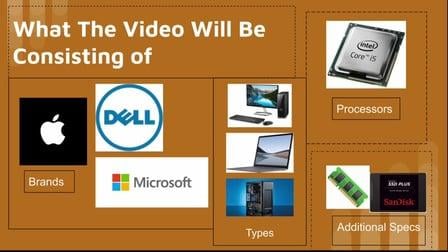
A video of where I teach you a quick a short way of choosing the right model and specs of a computer without spending a fortune on thing you won’t use. if aren’t already, make sure to upgrade to skill share premium as it helps me out and opens various topics of instrumental videos for you that otherwise wouldn’t be accessible to you.

Self Paced
Self-Paced
Google Cloud Digital Leader Training (Udacity) Udacity
Udacity,Google Cloud

Google Cloud Digital Leader Training (Udacity)

Gain foundational literacy in cloud and digital transformation. The Cloud Digital Leader Training course consists of a series of lessons designed to give you foundational knowledge about cloud technology and data. This training also offers an overview of Google Cloud products and services that enable organizations’ digital transformation.

Self Paced
Self-Paced
Introduction to Git and GitHub (Coursera) Coursera
Google

Introduction to Git and GitHub (Coursera)

In this course, you’ll learn how to keep track of the different versions of your code and configuration files using a popular version control system (VCS) called Git. We'll also go through how to setup an account with a service called GitHub so that you can create your very own remote repositories to store your code and configuration.

Jun 9th 2026
4 Weeks