How to Create Video for Online Courses (FutureLearn)

How to Create Video for Online Courses (FutureLearn)

Discover tools and techniques to plan, film, and edit high-quality videos for online learning. Learn how to create effective and engaging educational media. Increasingly, as education pivots online, educators are looking to filmmaking as a way of creating new and exciting content. On this two-week course from the University of Edinburgh, you’ll learn how to turn your mobile phone into a full-featured video production suite to create effective and engaging online course videos and media.

Class Deals by MOOC List - Click here and see FutureLearn's Active Discounts, Deals, and Promo Codes.

Develop the skills to script, storyboard, and film your videos
To create engaging videos that complement your online learning materials while also making the best use of time, equipment, and cost, you need to plan your content and filming schedule effectively.
You’ll start this course by looking at the pre-production process, including writing a script and creating a storyboard. Through these steps, you can make sure that you’re using the right shots while addressing your aims and refining your message.
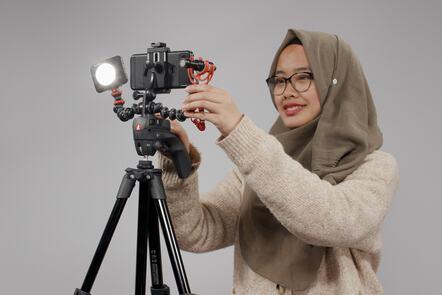
Then, you’ll move on to production, learning how to set up your equipment and capture different shot types through a range of practical activities.

Dive into post-production to prepare and edit your footage
During the second week of this course, you’ll explore the post-production process, from preparing your footage to basic editing techniques. Using free editing software that’s readily available, you’ll gain practical tips to get the most from your post-production.

Explore the legalities around accessibility and copyright for your online learning materials
Making online learning materials accessible is actually a legal requirement, and best practice for offering education opportunities to as broad a range of learning needs as possible.
This course will guide you through the importance of captions and transcripts, as well as how to use and correctly attribute third-party content and open educational resources.

Syllabus

Week 1: Pre-production
Week 2: Production and Post-production

What will you achieve?
By the end of the course, you‘ll be able to...

  • Create a pre-production plan (scriptwriting, storyboarding and sourcing footage).
  • Demonstrate the basics of filming including lighting, audio, and basic post-production skills.
  • Explain relevant legislation including accessibility and copyright in media production.
  • Improve learner engagement through effective use of media.
  • Identify and create video as responsible and sustainable open educational resources.

Who is the course for?
This course is designed for anyone interested in developing online educational media or just looking to improve their film production skills for online content creation.
It will be especially useful for learning technologists or those planning to teach online. It may be helpful for digital marketers and content creators looking to create short instructional-like videos.

Go to Class
MOOC List is learner-supported. When you buy through links on our site, we may earn an affiliate commission.

Related Courses

Bring Your Story to Life – Video Post-Production (Coursera) Coursera
University of Colorado Boulder

Bring Your Story to Life – Video Post-Production (Coursera)

In this course, we will explore the power and artistry of picture and sound editing. Although you’re welcome to use the editing software of your choice, we’ll be demonstrating non-linear editing using Adobe Premiere. We’ll share with you our editing workflow for completing a visual story, from scripting and writing conversationally to the visuals, to recording voice overs, to building the rough cut, and polishing with the final cut.

Jul 20th 2026
5-12 Weeks
How to Create an Online Course (Coursera) Coursera
University of Edinburgh

How to Create an Online Course (Coursera)

Learn how to design and develop online learning materials. Digital education is expanding faster than ever before, and learning online has become an essential part of how we teach and learn. On this two-week course, you’ll learn how to create online learning materials that are open, accessible, and engaging.

Jul 27th 2026
2 Weeks
DIY Filming: Creating Pro Video with Tools You Already Own | Learn with Vimeo (Skillshare) Skillshare
Skillshare

DIY Filming: Creating Pro Video with Tools You Already Own | Learn with Vimeo (Skillshare)

It's never been easier to create pro-looking video. Join Vimeo's Mark Cersosimo to learn a straightforward, artistic approach to making a 60-second video for promotion or content marketing, using just your iPhone and a few everyday tools. This one-hour class is broken into 10 bite-sized videos that are approachable and fun to watch.

Self Paced
Self-Paced
How to Create an Online Course (FutureLearn) FutureLearn
University of Edinburgh

How to Create an Online Course (FutureLearn)

Discover key skills to create engaging online learning experiences. Learn how to design and develop online learning materials. Digital education is expanding faster than ever before, and learning online has become an essential part of how we teach and learn. On this two-week course, you’ll learn how to create online learning materials that are open, accessible, and engaging.

Self Paced
2 Weeks
Designing Online Courses with the 7Cs Framework (EMMA) EMMA
University of Bath,University of Naples Federico II

Designing Online Courses with the 7Cs Framework (EMMA)

The 7Cs is a powerful seven-stage process that helps educators and designers create effective courses using digital technologies. In this MOOC, you will learn collaboratively with other students and from experts in the field. Throughout the 6 weeks, you will work on the design (or redesign!) of a technologically enhanced course.

Self-Paced
Self-Paced
Design a World-Class Course on OpenLearning (OpenLearning) OpenLearning
OpenLearning

Design a World-Class Course on OpenLearning (OpenLearning)

Want to dive into the world of teaching online? In this course, learn how to create an effective MOOC using best practice instructional design and tools within the OpenLearning Platform. Teaching online allows you to connect with more students than ever before. But designing a MOOC that enables students to learn deeply and keeps them engaged and motivated throughout, requires the use of some key pedagogical strategies.

Self-paced
Self-Paced
Creating Effective Online and Blended Courses (Stanford Online) Lagunita Stanford Online
Stanford University

Creating Effective Online and Blended Courses (Stanford Online)

Creating Effective Online and Blended Courses was produced by the Open Learning Initiative This link opens in a new tab at Stanford University with contributions from the Vice Provost for Teaching and Learning This link opens in a new tab at Stanford University. These resources, designed for a general audience of instructors at 2-and 4-year higher education institutions, will help such instructors develop online courses or incorporate online learning approaches in their on-campus classes.

Self-Paced
Self-Paced
Instructional Design: Course Planning and Pedagogy (FutureLearn) FutureLearn
University of California, Irvine

Instructional Design: Course Planning and Pedagogy (FutureLearn)

Unpack learning theories and methods of teaching to ensure you deliver effective results in the course planning stage. Set your course up for success using instructional design models and theories. Before any instructional designer can start developing a course, you need to ensure the course environment is set up and that you have the basic tools to facilitate the course design. On this three-week course, you’ll learn how to master the course planning stage to ensure the success of the rest of the process.

Jun 6th 2022
3 Weeks
Animating Illustrations: Fundamentals of After Effects (Skillshare) Skillshare
Skillshare

Animating Illustrations: Fundamentals of After Effects (Skillshare)

Ever just want to jump right into After Effects but feel it's way too complicated? This is the perfect time for you to start! You'll be learning how to bring an illustration to life using this fabulously creative program. Firstly, we'll take a quick tour around After Effects so you can get to know the interface and from there we'll import and convert an Adobe Illustrator file for use in After Effects and then use it to do some very simple animation so you can get used to keyframing and the timeline.

Self Paced
Self-Paced
Youtube An Advance Guide For A Successful Youtube Channel (Eduonix) Eduonix
Eduonix Learning Solutions Pvt. Ltd.

Youtube An Advance Guide For A Successful Youtube Channel (Eduonix)

Learn the ins and outs of becoming a successful vlogger & correctly setting up your YouTube Channel in this YouTube Course. The names Pewdiepie, iisuperwomanii and Grace Helbig have become household names owing to their fame on YouTube. YouTube has become a phenomenon platform for, as its motto suggests, to broadcast yourself. With the right tools and knowledge, you can become a famous YouTuber, yourself.

Self Paced
Self-Paced