Creative Concepting: Getting to Better Ideas Faster (Skillshare)

Offered by Skillshare,
Creative Concepting: Getting to Better Ideas Faster (Skillshare)

As a professional in the design industry, execution shouldn’t be the most time-consuming part of your day. By taking this 40 minute course with Jessica Moon, Creative Director at Digital Telepathy, you will be exposed to a multitude of exercises, concepts, and tactics that will optimize the way you work when designing, allowing you to iterate and experiment more rapidly. In this class, Jessica will help you get to your best ideas faster by instilling good habits that you can always lean on.

These habits will come from two areas:

  1. Mastery of your creative workflow and tool (photoshop in this instance) techniques
  2. Utilizing a broad set of creative prompts that’ll help you branch your idea out in multiple directions

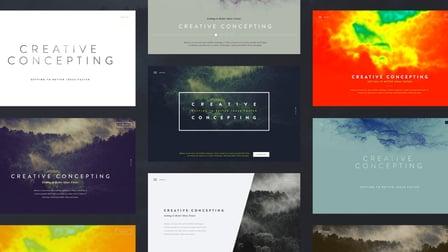
Once you’ve gotten a good grasp of these things, you’ll be ready to take on the class project, creating a Concept Ideation Board – which is both a framework and tool that’ll allow you to ideate multiple design concepts quickly.
This class is great for anyone looking to really take their design ideation to a new level or for those looking to refine their workflow and ground in some great habits that can better promote speed and efficiency. With that said, you should also have some familiarity with Adobe Photoshop going into this.
Since this class is all about creating great habits, you’ll hopefully find yourself revisiting parts of this class and using the resources provided to further refine and evolve your workflow. By doing so, you’ll become more nimble and effective in your workflow and ideation, ultimately allowing you to successfully arrive at your best ideas faster.
Once you’ve familiarized yourself with the creative prompts introduced in Unit 4, you’ll be able to take the Concept Ideation Board PSD template (attached), and use it to produce six design concepts based around a simple layout (in my case, a header of a marketing site). What you’ll specifically be doing in the PSD:

  1. In your first box, create a simple layout of your choice.
  2. In the remaining five boxes, pick a couple creative prompts (feel free to pick only one or combine several different kinds) and then iterate on your creative vision using the creative prompts to guide your design direction.
  3. Try to timebox each iteration within a 10-20 minute interval and be sure to label each iteration with the creative prompts you draw inspiration from.
  4. After doing all 6, quickly evaluate the best 1 or 2 concepts you think are most promising of teh bunch and highlight them in the PSD.

The final result of this class project will be a fully fleshed out Concept Ideation Board with 1-2 highlighted layouts that you think are the most promising – this last part is important because it’ll give you a new starting point to then refine or continue ideating on using the same framework.

Go to Class
MOOC List is learner-supported. When you buy through links on our site, we may earn an affiliate commission.

Related Courses

Photoshop Fundamentals in One Hour (Skillshare) Skillshare
Skillshare

Photoshop Fundamentals in One Hour (Skillshare)

If you’ve ever wanted to try digital painting, but you’re intimidated by photoshop, this course is for you! We’ll go through all of the software’s core functions and tools in a series of easy-to-follow lessons that will have you up and running in no time. These lessons are the building blocks that you will carry forward to the incredibly cool digital painting courses that we offer. So enroll today and let's get you on board with Photoshop!

Self Paced
Self-Paced
Create a Hand-Drawn .GIF in Photoshop (Skillshare) Skillshare
Skillshare

Create a Hand-Drawn .GIF in Photoshop (Skillshare)

Want to spruce up your blog or website with cute, animated GIFs? Ever needed the perfect reaction GIF for that one meme you love? (We've all been there.) Take this class to learn how you can make one yourself! I'll take you through the entire process of animating hand-drawn characters and lettering in Photoshop, from rough test runs to exporting. It's a lot easier than you might think!

Self Paced
Self-Paced
Web Design Essentials: Creating Marketing Homepages That Drive Results  (Skillshare) Skillshare
Skillshare

Web Design Essentials: Creating Marketing Homepages That Drive Results (Skillshare)

Design websites that drive results! In this 60-minute class, join Dennis Field — a designer and product evangelist for web prototyping leader InVision — as he shares how to refine your creative process, capitalize on feedback, and use best practices to design a marketing site that leads to conversions for your company. This class is perfect for freelance website and product designers, small web design teams, and everyone who wants to increase the effectiveness of their web design.

Self Paced
Self-Paced
Hacking Digital Styleguides for Accessibility: Type, Color, Imagery (Skillshare) Skillshare
Skillshare

Hacking Digital Styleguides for Accessibility: Type, Color, Imagery (Skillshare)

Accessible design is more important than ever, with over 15% of people affected by a disability that changes how they interact with the web. As designers, it is our responsibility to ensure our designs are inclusive and reflect all of our users' needs. Join independent interactive art director and designer Tatiana Mac on a 42-minute class that will show you how to consider accessibility for your next project.

Self Paced
Self-Paced
WordPress for Beginners - Understand WordPress Quickly (Skillshare) Skillshare
Skillshare

WordPress for Beginners - Understand WordPress Quickly (Skillshare)

Learn how to work with WordPress and develop a website using AIT WordPress Themes. No coding or experience required. This class presents the basics of working with WordPress and offers practical screencast tutorials to teach you how to use our themes when building a new website. In short videos, you can find answers to FAQs that beginners most often encounter when getting familiar with WordPress. The course contains more than one hour of video tutorials.

Self Paced
Self-Paced
Kickstart your Creativity: Introduction to Mood Boards (Skillshare) Skillshare
Skillshare

Kickstart your Creativity: Introduction to Mood Boards (Skillshare)

The ability to create a compelling mood board is an incredibly useful skill, whether you’re a designer, photographer, dancer or writer. It will kickstart your creative thinking and help you sell your ideas to clients. Join creative director, Nancy Herrmann in this self-paced class as she guides you through her step-by-step process for transforming random ideas into a professional quality presentation.

Self Paced
Self-Paced
Curiosity & Relentless Observation (Skillshare) Skillshare
Skillshare

Curiosity & Relentless Observation (Skillshare)

This class is part of Skillshare's Creativity & Innovation series. We believe curiosity is a crucial skill for cultivating creativity since being curious will open your mind to new observations and insights you'd have otherwise missed. In this short class, you'll learn to integrate observation through curiosity into your life everyday, unlocking innovative ideas and adventure.

Self Paced
Self-Paced
Shopify Essentials for Web Developers: From Store Setup to Custom Themes (Skillshare) Skillshare
Skillshare

Shopify Essentials for Web Developers: From Store Setup to Custom Themes (Skillshare)

Join Shopify Expert and agency owner Kurt Elster to learn how to setup, design, build, and customise a Shopify ecommerce store. Intended for web designers and developers, this course is a primer on the complete Shopify ecosystem, with a focus on how to get started with theme modification, a stepping stone to complete custom development.

Self Paced
Self-Paced